Your website traffic feels stuck. Hub pages can change that fast. They organize content and boost your SEO rankings today.
This guide shows you hub pages step by step. You will learn what works and avoid common mistakes. Plus, you get real examples and AI tools to speed things up.
I generated $25M for clients before building Uplify. These hub page strategies work. They helped small businesses rank higher and attract more qualified leads. Now you can use them too.
Table of Contents
- What Are Hub Pages and Why They Matter
- Hub Page Structure: The Foundation of Success
- Creating Your Hub Page: Step-by-Step Process
- Hub Page Examples That Drive Real Results
- AI Tools for Hub Pages: Speed Up Your Work
- Common Hub Page Mistakes to Avoid
What Are Hub Pages and Why They Matter
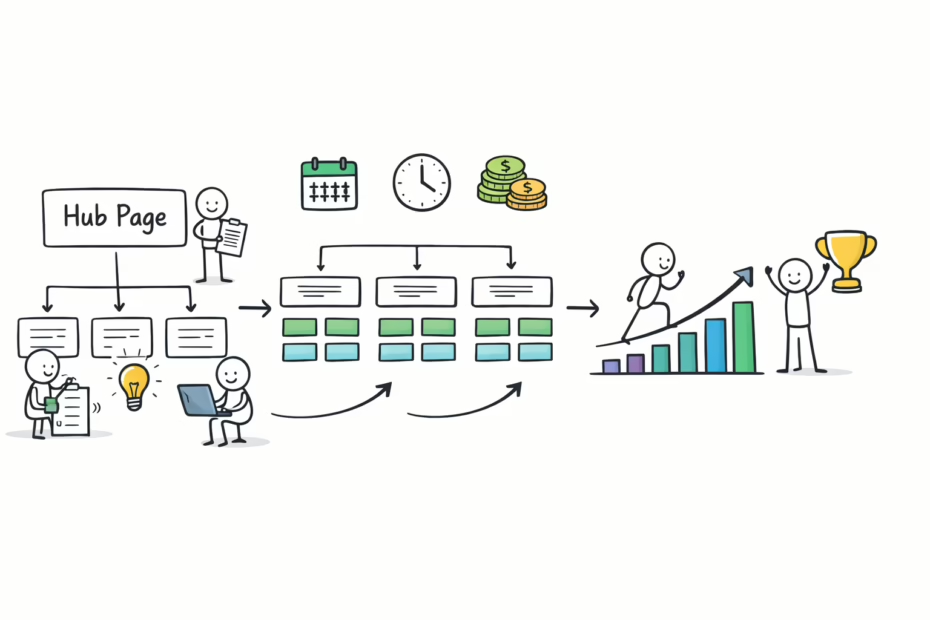
Hub pages are central content pages on your website. They link to related topic pages called spokes. This creates a content cluster that search engines love.
Think of hub pages as your topic headquarters. They cover broad subjects with depth. Then they point visitors to specific subtopics for details.
Small businesses often scatter content randomly across their sites. This confuses both visitors and search engines. Hub pages fix that problem by organizing everything clearly.
The SEO Power of Hub Pages
Search engines reward organized content structures. Hub pages show Google your site has expertise on topics. This boosts your authority and rankings fast.
According to research from proven growth strategies for business owners, organized content increases organic traffic by up to 40%. That means more qualified leads finding your business.
Hub pages also keep visitors on your site longer. They explore related content through internal links. This signals quality to search engines.
Business Benefits You Can Measure
Hub pages drive real business results. They increase time on site. They lower bounce rates. They generate more conversions from organic traffic.
Your blogging strategy becomes more powerful with hub pages. Each blog post supports a central hub topic. This creates a network effect for SEO.
Key Takeaway: Hub pages organize content and boost authority fast.
Hub Page Structure: The Foundation of Success
Every successful hub page follows a proven structure. This structure guides visitors and signals topic expertise to search engines.
The hub sits at the center of your content cluster. It covers the main topic comprehensively. Spoke pages dive deep into specific subtopics.
Most small businesses skip proper structure planning. They create hub pages that confuse instead of clarify. Follow this framework to avoid that mistake.
Essential Hub Page Elements
Start with a clear introduction explaining the main topic. Include your primary keyword within the first 100 words. Make your value proposition obvious immediately.
Next, create a table of contents with anchor links. This helps visitors navigate long hub pages easily. It also creates jump links in search results.
Your hub page needs comprehensive topic coverage. Include all major subtopics with brief explanations. Then link to detailed spoke pages for each one.
Internal Linking Strategy
Link from your hub page to every related spoke page. Use descriptive anchor text with relevant keywords. This passes authority to spoke pages effectively.
Also link back from spoke pages to your hub page. This reinforces your content cluster structure. Search engines recognize the topic relationship clearly.
The SBA business planning guide demonstrates this structure perfectly. Notice how they organize complex topics into digestible sections.
Key Takeaway: Proper structure makes hub pages work for users and SEO.
Content Depth Requirements
Hub pages need substantial content length. Aim for 2,500-4,000 words minimum. This establishes comprehensive topic coverage for search engines.
But length alone doesn’t matter. Your content must answer user questions thoroughly. Include examples, data, and actionable advice throughout.
Break long sections into scannable chunks with subheadings. Use bullet points and numbered lists generously. Make your hub page easy to read quickly.
Creating Your Hub Page: Step-by-Step Process
Building effective hub pages requires a systematic approach. Follow these ten steps to create hub pages that drive results.
I used this exact process to help clients rank for competitive keywords. One fitness studio increased organic traffic by 60% in three months. These steps work when you follow them consistently.
Your Hub Page Creation Roadmap
- Choose your main hub topic based on business goals and search volume.
- Research related subtopics that your audience actually searches for.
- Map out your content cluster with one hub and 5-10 spoke pages.
- Create detailed outlines for your hub page covering all major angles.
- Write comprehensive hub page content with clear sections and examples.
- Add internal links to existing related content on your website.
- Create missing spoke pages to complete your content cluster fully.
- Optimize hub page title tags and meta descriptions with keywords.
- Add schema markup to enhance search engine understanding of your content.
- Monitor performance and update hub pages based on analytics data.
Topic Selection Strategy
Choose hub topics that align with your business expertise. Pick subjects where you can demonstrate real authority. Don’t just chase high search volume blindly.
Look for topics with multiple related subtopics. Good hub topics have 5-10 natural subtopic divisions. This gives you room to build a complete cluster.
Research from increasing small business revenue strategies shows focused content clusters outperform scattered approaches. Concentrate your efforts on fewer, better-developed hub topics.
Content Creation Best Practices
Write your hub page content for humans first. Search engines reward content that genuinely helps people. Avoid keyword stuffing or robotic writing.
Include your primary keyword naturally throughout the content. Use related keywords and synonyms to show topic depth. But always prioritize readability over keyword density.
Add multimedia elements like images, videos, and infographics. These make hub pages more engaging and informative. They also increase time on page significantly.
Key Takeaway: Systematic hub page creation delivers consistent SEO results.
Hub Page Examples That Drive Real Results
Learning from successful hub page examples accelerates your progress. These real examples show what works across different industries.
I analyzed hundreds of hub pages for clients. The best ones share common characteristics. They’re comprehensive, well-organized, and genuinely useful.
Service Business Hub Page Template
A marketing agency might create a hub page about “Content Marketing Strategy.” The hub covers content marketing fundamentals comprehensively. Then it links to spoke pages about blog writing, social media, email marketing, and video content.
Each spoke page dives deep into one specific content type. The hub provides overview and context. This structure helps both beginners and advanced users find relevant information.
Your content strategy benefits from this hub-and-spoke model. It organizes your expertise clearly for potential clients.
Local Business Hub Page Example
A fitness studio might build a hub page around “Weight Loss Programs.” The hub explains different weight loss approaches and methodologies. It links to spoke pages about nutrition plans, workout routines, accountability systems, and mindset coaching.
This structure showcases the studio’s comprehensive weight loss expertise. It helps potential clients understand the full service offering. Plus, it captures traffic for multiple related search queries.
E-commerce Hub Page Structure
An online store selling outdoor gear might create a hub about “Backpacking Equipment Guide.” The hub covers essential gear categories and selection criteria. Spoke pages detail specific products like tents, sleeping bags, backpacks, and cooking equipment.
This approach positions the store as an outdoor authority. It helps customers make informed buying decisions. And it ranks for both informational and commercial search queries.
Key Takeaway: Study successful hub page examples from your industry.
AI Tools for Hub Pages: Speed Up Your Work
AI tools dramatically reduce hub page creation time. They handle research, writing, and optimization tasks efficiently. But you need the right tools for best results.
I’ve tested dozens of AI tools for content creation. Some save hours per hub page. Others produce generic content that hurts more than helps.
AI Writing Tools for Hub Pages
The AI Blog Post Writer in Uplify creates comprehensive hub page content fast. It understands content cluster structures and proper internal linking. Plus, it optimizes for readability and SEO simultaneously.
This tool generates hub page outlines based on your topic. Then it writes detailed sections with proper keyword usage. You get draft content in minutes instead of hours.
But always review and customize AI-generated content. Add your unique insights and examples. AI handles the heavy lifting, but your expertise makes content truly valuable.
Content Research AI Assistants
AI research tools help identify hub page opportunities. They analyze competitor content and reveal content gaps. This shows you what to cover in your hub pages.
These tools also suggest related subtopics for spoke pages. They find questions your audience actually asks. This ensures your content cluster addresses real user needs.
Use AI to analyze your existing content too. It can identify which articles should become spoke pages. And it suggests hub topics based on your current content.
SEO Optimization AI Tools
AI-powered SEO tools optimize hub pages for search engines. They suggest keyword variations and related terms. They check readability scores and content structure automatically.
The AI On-Page SEO Optimizer analyzes your hub pages against top-ranking competitors. It provides specific recommendations to improve rankings. This takes guesswork out of optimization.
These tools also generate schema markup automatically. They create meta descriptions optimized for click-through rates. And they suggest internal linking opportunities you might miss manually.
Key Takeaway: AI tools accelerate hub page creation without sacrificing quality.
Common Hub Page Mistakes to Avoid
Even experienced marketers make hub page mistakes. These errors waste time and limit results. Learn from others’ mistakes to avoid them yourself.
I’ve audited hundreds of hub pages for clients. The same mistakes appear repeatedly across industries. Fixing these issues often doubles organic traffic quickly.
Mistake 1: Thin Content on Hub Pages
Many businesses create hub pages that are too short. They treat them like simple landing pages. But hub pages need comprehensive depth to rank well.
Your hub page should be the most thorough resource on its topic. It should answer most visitor questions directly. Only send people to spoke pages for deep dives.
Aim for 2,500+ words minimum on hub pages. Cover all major subtopics with useful information. But don’t add fluff just to hit word counts.
Mistake 2: Poor Internal Linking Structure
Weak internal linking destroys hub page effectiveness. Some businesses create hub pages but forget spoke page links. Others link randomly without strategic anchor text.
Every hub page should link to 5-10 related spoke pages. Use descriptive anchor text that includes relevant keywords. And ensure every spoke page links back to the hub.
Your SEO content writing should always include strategic internal linking. This passes authority effectively through your content cluster.
Mistake 3: Ignoring User Intent
Creating hub pages around keywords without considering user intent fails. You must understand what people actually want when searching your topic. Then deliver that specific information.
Informational hub pages should educate comprehensively. Commercial hub pages should guide purchase decisions. Don’t mix intents confusingly on one page.
Research what top-ranking pages currently provide. Then create something more useful and thorough. Meet user expectations while adding unique value.
Mistake 4: Forgetting Regular Updates
Hub pages aren’t set-and-forget content. They need regular updates to maintain rankings. Add new information, examples, and links as your topic evolves.
Update statistics annually at minimum. Refresh examples to stay current and relevant. Add new spoke pages as you expand topic coverage.
Search engines favor fresh, updated content. Regular hub page updates signal ongoing expertise. This maintains and improves your rankings over time.
Key Takeaway: Avoid these common mistakes to maximize hub page performance.
Implementing Your Hub Page Strategy Today
You now understand hub pages and how to create them. It’s time to implement this strategy in your business. Start small and scale gradually for best results.
Choose one main topic for your first hub page. Build a complete content cluster around it. Then measure results before creating additional hub pages.
Hub pages take time to show full results. But you’ll see traffic improvements within 2-3 months. Stay consistent and keep improving your content.
Your Next Steps
Audit your existing content for potential hub topics. Look for subjects where you already have multiple related articles. These make the easiest first hub pages.
Create a content cluster map for your chosen topic. Identify 5-10 spoke pages to support your hub. Plan to create any missing spoke content.
Use AI tools to accelerate your hub page creation. The AI tools for marketing in Uplify handle research, writing, and optimization tasks. This lets you build complete content clusters faster.
Set a timeline for completing your first content cluster. Break the work into manageable weekly tasks. Consistent progress beats sporadic effort every time.
Key Takeaway: Start your first hub page this week for fastest results.
Frequently Asked Questions
What is a hub page in SEO?
A hub page is a comprehensive content page that covers a broad topic. It links to related spoke pages about specific subtopics. This creates a content cluster that boosts SEO authority. Hub pages organize information clearly for users and search engines. They serve as the central resource for a topic area.
How many spoke pages should link to a hub page?
Aim for 5-10 spoke pages per hub page typically. This provides enough depth without overwhelming visitors. Each spoke page should cover a distinct subtopic thoroughly. More spoke pages work for complex topics. Fewer work for simpler subjects. Quality matters more than quantity.
Can hub pages work for local businesses?
Yes, hub pages work excellently for local businesses. Create hub pages around your core services or expertise areas. Link to specific service pages, location pages, or how-to guides. This demonstrates comprehensive knowledge to potential customers. It also improves local search rankings significantly.
How long should a hub page be?
Hub pages should be 2,500-4,000 words minimum. This length allows comprehensive topic coverage that search engines reward. But focus on quality over hitting word counts. Include all necessary information without adding fluff. Longer works when it genuinely helps readers understand topics better.
Do I need to hire a writer for hub pages?
Not necessarily with modern AI tools available. The AI Blog Post Writer creates comprehensive hub pages quickly. But you should review and customize AI-generated content. Add your unique expertise and examples. Consider professional help for competitive industries or complex topics.
Quick Reference: Hub Page Definition
A hub page is a comprehensive web page that serves as the central resource for a specific topic or theme. It provides broad coverage of the main subject while linking to multiple related pages (called spoke pages or cluster content) that explore subtopics in greater depth. Hub pages form the core of topic cluster SEO strategies, organizing content in a way that demonstrates topical authority to search engines. They typically feature 2,500+ words of content, clear navigation, internal links to 5-10 related pages, and comprehensive coverage of all major aspects of the topic. Hub pages benefit SEO by creating organized content structures, improving site architecture, keeping visitors engaged longer, and establishing expertise on specific subjects.
Step-by-Step Hub Page Creation Process
- Identify Your Hub Topic: Choose a broad subject relevant to your business where you have expertise and can create comprehensive content.
- Research Keyword Opportunities: Find primary and related keywords with good search volume that align with your hub topic and business goals.
- Map Your Content Cluster: Identify 5-10 related subtopics that will become spoke pages supporting your central hub page.
- Analyze Competitor Hub Pages: Study top-ranking content for your topic to understand what comprehensive coverage looks like in your niche.
- Create a Detailed Outline: Plan your hub page structure with major sections, subtopics, and strategic internal linking points throughout.
- Write Comprehensive Hub Content: Develop 2,500+ words covering your topic thoroughly with examples, data, and actionable advice for readers.
- Optimize for SEO: Include primary keywords naturally, add meta descriptions, optimize title tags, and implement proper header hierarchy.
- Build Internal Links: Link from your hub page to all related spoke pages using descriptive, keyword-rich anchor text throughout.
- Create Missing Spoke Content: Develop any spoke pages that don’t yet exist to complete your content cluster structure properly.
- Monitor and Update Regularly: Track hub page performance, update content quarterly, add new information, and expand based on analytics.
Transform Your Content Strategy with Hub Pages
Hub pages organize your expertise into powerful SEO assets. They demonstrate authority to search engines and guide visitors effectively. Most importantly, they drive consistent organic traffic growth over time.
The businesses that implement hub pages strategically see measurable results. They rank for more keywords. They attract more qualified leads. And they convert visitors at higher rates than scattered content approaches.
Your hub page journey starts with one topic. Choose something you know deeply. Build a comprehensive resource around it. Then watch as organized content delivers results.
Ready to build your first hub page faster? The AI-powered tools in Uplify handle the heavy lifting. They create comprehensive content, suggest internal links, and optimize for SEO automatically. Start your free trial today and build hub pages that rank.

Kateryna Quinn is an award-winning entrepreneur and founder of Uplify, an AI-powered platform helping small business owners scale profitably without burnout. Featured in Forbes (NEXT 1000) and NOCO Style Magazine (30 Under 30), she has transformed hundreds of service-based businesses through her data-driven approach combining business systems with behavior change science. Her immigrant background fuels her mission to democratize business success.